The promise of modern software engineering has been distilled into a singular, seductive pitch: describe your vision in natural language, watch the code materialize, and ship your product faster than ever before. For decades, the craft of programming was synonymous with the rhythmic clatter of keys and the meticulous management of syntax. Today, that paradigm is shifting beneath our feet.
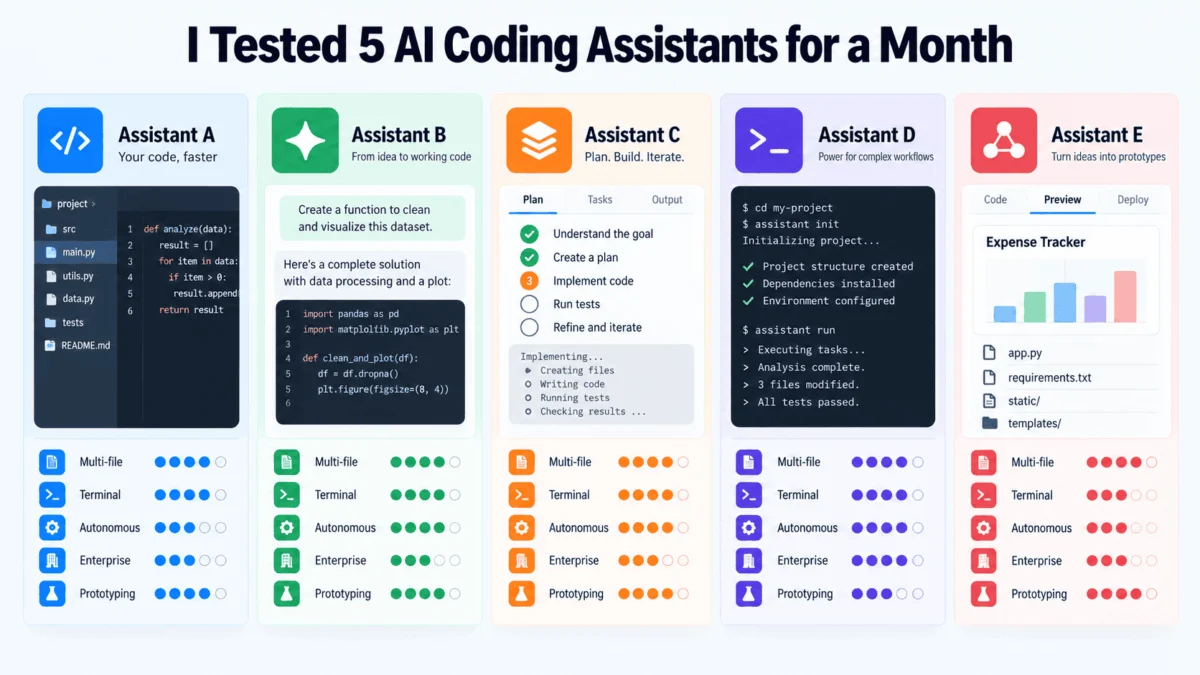
To determine how much of this "AI revolution" is substance versus marketing, we spent one month stress-testing five of the industry’s most prominent AI coding assistants. From legacy refactors to greenfield API builds and complex debugging sessions, the results were not a clear-cut victory for any single tool. Instead, the testing revealed a landscape of diverging philosophies, each betting on a different future for the human developer.
The Philosophical Divide: How AI Views the IDE
The fundamental difference between these tools lies in their architectural DNA. They are not merely "autocomplete" engines anymore; they are distinct approaches to the software development lifecycle (SDLC).
- Cursor seeks to redefine the Integrated Development Environment (IDE) entirely.
- GitHub Copilot aims to augment the professional developer’s existing workflow within familiar ecosystems.
- Claude Code prioritizes reasoning, operating directly within the terminal as an extension of the developer’s command-line intuition.
- Windsurf (Devin Desktop) treats the workspace as a persistent, autonomous entity.
- Replit Agent treats the entire development stack—from hosting to coding—as a browser-based, "blank-canvas" experience.
Chronology of the Testing Phase
Over the course of 30 days, we put these tools through a rigorous, repeatable testing regimen to ensure parity in our observations.
Week 1: The Legacy Refactor. We tasked each tool with modifying a moderately complex Django backend. This involved renaming core data models and propagating those changes through serializers, unit tests, and migrations. Cursor excelled here, maintaining context across dozens of files, whereas Copilot required more manual hand-holding to keep the global architecture in sync.
Week 2: The Greenfield API Build. We shifted to a fresh, "from-scratch" API build. Here, Replit Agent and Windsurf shone. Replit managed the entire stack, spinning up a database and a live URL in under an hour, while Windsurf proved adept at handling ongoing state management throughout the build.
Week 3: The Debugging Gauntlet. We introduced intentional, obscure bugs into a React-based frontend. Claude Code’s terminal-first approach allowed it to cycle through test failures, interpret error logs, and iterate on solutions with a level of "reasoning" that felt more like a senior engineer than a script.
Week 4: Long-term Maintenance. The final week focused on stability. We examined how these tools handled "drift"—the phenomenon where an AI, through multiple edits, slowly deviates from the original architectural intent of the codebase.
Supporting Data and Comparative Analysis
Cursor: The AI-Native Powerhouse
Cursor is built on a fork of VS Code, making it immediately familiar to most professionals. However, its "Composer" and "Agent" modes represent a departure from traditional coding.
- Pros: Exceptional multi-file awareness. It understands the "why" behind your file structure.
- Cons: Autonomy comes with risk. It can silently adjust files you didn’t intend to change if the prompt is vague.
- Pricing: ~$20/month for Pro.
GitHub Copilot: The Enterprise Standard
Copilot remains the benchmark for integration. It is the most "plug-and-play" tool on the list.
- Pros: Deep integration with GitHub’s ecosystem (Issues, Pull Requests, Codespaces). It is the most compliant and secure option for large teams.
- Cons: As an add-on, it lacks the "deep-editor" control that tools like Cursor provide.
- Pricing: $10/month for individuals.
Claude Code: The Logical Architect
Anthropic’s entry is a terminal-based agent that focuses on reasoning. It is arguably the most "intellectual" of the bunch.
- Pros: It excels at complex, multi-step logic. If you need to solve a puzzle rather than just generate boilerplate, this is the tool.
- Cons: No GUI means a steep learning curve and a reliance on command-line proficiency.
- Pricing: Consumption-based API usage.
Windsurf: The Persistent Workspace
Acquired by Cognition (the creators of Devin), Windsurf is built around "Cascade," a feature that keeps the AI aware of your workspace state at all times.
- Pros: Maintains context across long, multi-day sessions better than any competitor.
- Cons: Prone to architectural drift during very long, open-ended sessions.
- Pricing: ~$15/month.
Replit Agent: The Rapid Prototyper
Replit is the most ambitious tool, effectively replacing the need for a local environment.
- Pros: Unmatched speed from "idea" to "deployed URL."
- Cons: Limited in production-grade complexity. It is a starting point, not a complete, enterprise-ready build system.
- Pricing: ~$25/month for Core features.
Official Perspectives and Industry Implications
The consensus among engineering leads is shifting from "Will AI replace developers?" to "How do we manage AI-generated debt?"
Anthropic, in recent documentation regarding Claude Code, emphasizes that the tool is designed to work with the developer, acting as an iterative partner that runs tests and observes failures, rather than a "magic button" that writes perfect code in one go. Similarly, GitHub’s leadership continues to frame Copilot as a productivity multiplier that removes the "drudgery" of coding—writing boilerplate, documenting functions, and translating between languages—allowing the developer to focus on high-level system design.
The implications for the industry are profound. First, the cost of prototyping has collapsed. Features that once took days of environment setup can now be validated in hours. Second, the definition of "Seniority" is changing. A senior engineer’s value is shifting from the ability to write syntax to the ability to critique, audit, and orchestrate AI-generated code.
The Verdict: Which Tool Should You Choose?
Our month-long analysis concludes that there is no "best" assistant, only the right tool for your specific workflow.
- If you manage massive, complex codebases: Cursor is the current leader. Its ability to handle cross-file refactors is unmatched.
- If you work within a large enterprise: GitHub Copilot is the only logical choice due to its security, policy controls, and integration with the Microsoft/GitHub stack.
- If you are a terminal power-user: Claude Code will feel like a natural extension of your brain.
- If you need a "project partner" for long-term builds: Windsurf provides the most consistent, state-aware experience.
- If you are a founder or student needing a quick MVP: Replit Agent will save you weeks of configuration time.
Final Thoughts: The Road Ahead
We are currently in the "wild west" era of AI coding assistants. The tools tested here will likely evolve significantly within the next six months. The most important takeaway is that these tools are no longer mere demos; they are functional components of a modern software engineering department.
The developers who will thrive in the next five years are not necessarily those who have memorized the most libraries, but those who have mastered the art of "AI orchestration"—the ability to frame problems, verify AI output, and integrate these agents into a sustainable development pipeline. As you begin your own experimentation, do not ask which tool is the most popular; ask which one fits the shape of your work. The answer is already waiting in your terminal, your IDE, and your browser.
About the Author:
Vinod Chugani is an AI and data science educator who bridges the gap between emerging AI technologies and practical application for working professionals. With a background in quantitative finance and a focus on agentic AI, Vinod specializes in helping developers and data professionals navigate the shift toward automated, AI-augmented workflows.