When a high-performing product page suddenly slips in search rankings, or a competitor starts outperforming your best content, the immediate need for data can be overwhelming. SEO professionals and site owners often feel the pressure to launch a massive, time-consuming site crawl to find the culprit. However, the most effective triage often begins not with a site-wide crawl, but with a surgical, page-level analysis.
SEOquake, the industry-standard Chrome extension by Semrush, provides a streamlined, rapid-fire solution to this problem. By allowing users to audit technical signals, on-page SEO, and link architecture without ever leaving the browser tab, it turns complex diagnostic work into a three-minute workflow. This guide outlines how to move from initial triage to actionable diagnosis using this powerful tool.

Understanding the SEOquake Ecosystem
At its core, SEOquake is designed for speed. It functions as a lightweight layer over any webpage, providing an instant visual dashboard of the technical health and authority metrics of that URL.

The tool utilizes a color-coded reporting system to ensure that users can immediately distinguish between critical errors and minor optimizations:

- Red: Indicates high-priority issues that likely impact search visibility or user experience. These require immediate attention.
- Orange: Represents warnings. These are not necessarily "broken" features, but they are areas where best practices are not being fully met.
- Green: Signals that the element is configured correctly according to standard SEO guidelines.
By leveraging these visual cues, auditors can bypass irrelevant data and focus their energy on the components of a page that are actually driving—or hindering—performance.

Minute One: Triage via the Quick View Pop-Up
The first 60 seconds of your audit should be dedicated to "triage." The goal is not to fix problems, but to identify them. By clicking the SEOquake browser icon, you open the Quick View panel, which is categorized into five essential tabs: Page Info, Diagnosis, Internal, External, and Density.

For a rapid assessment, focus your attention on the Page Info, Audit, and Content tabs.

Assessing Core SEO Elements
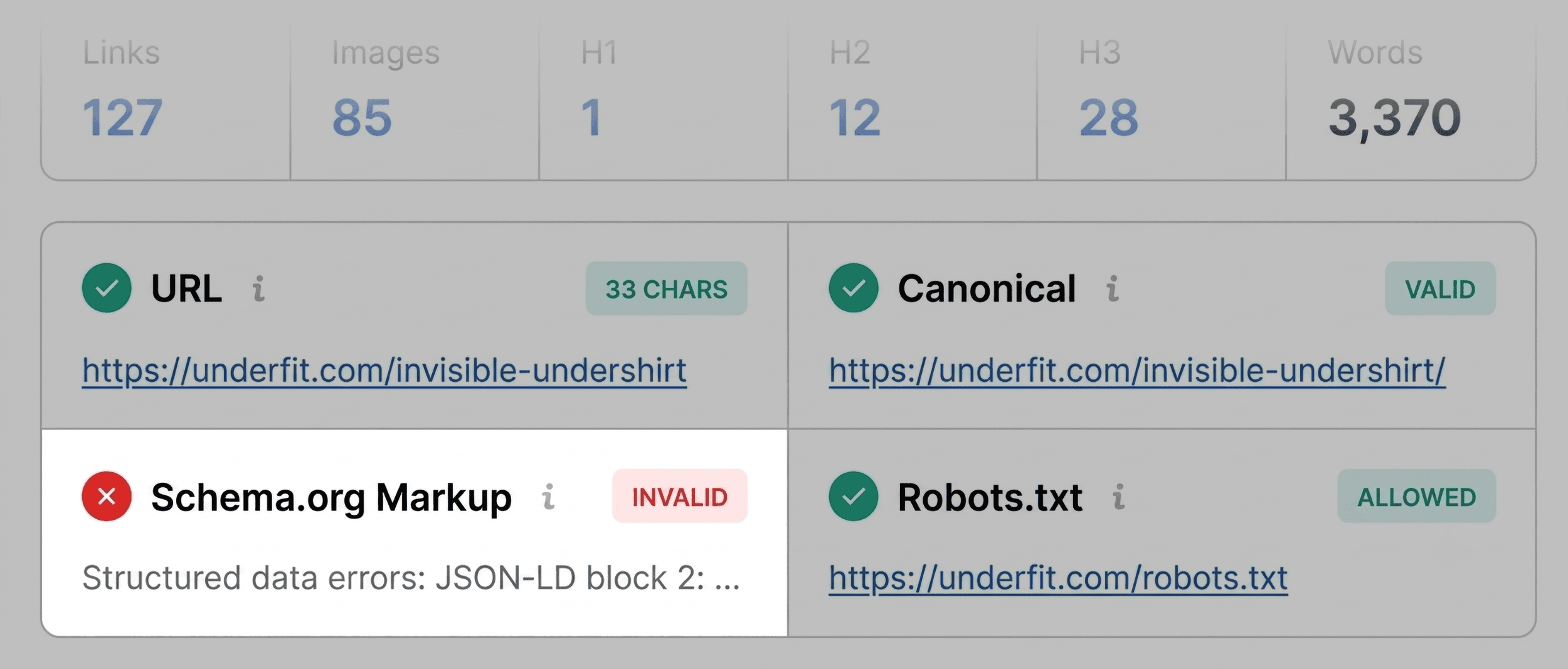
The Page Info tab serves as your baseline. Within 20 seconds, you should evaluate the most critical on-page factors:

- Title Tags: Are they descriptive, optimized, and within length limits?
- Meta Descriptions: Do they provide a compelling reason for a user to click?
- URL Structure: Is the slug clean and keyword-relevant?
- Canonical Tags: Does the page point to itself correctly to prevent duplicate content issues?
- Schema Markup: Is structured data present and valid?
In a recent test of a product page, the SEOquake extension immediately flagged the Schema.org markup in red. The tool identified JSON-LD errors, which effectively disqualified the page from appearing in rich results (such as price and rating stars) in search engine results pages (SERPs). This single, 60-second discovery highlights the value of the tool: identifying a revenue-impacting error that could have gone unnoticed for months.

Auditing Technical Foundations
After checking the basics, move to the Audit tab. This is where you look for the "under the hood" issues that don’t always appear on the surface. Here, SEOquake scans for technical essentials, including:

- HTTPS security status.
- The presence and validity of meta robots tags.
- Mobile-friendly compliance.
- Sitemap availability.
While many of these items may be green, pay close attention to orange warnings. For example, missing hreflang tags on an international site or subtle issues with mobile viewport configuration can be the silent killers of organic traffic.

Minutes Two and Three: The Deep Dive Diagnosis
Once the triage phase is complete and you have identified the primary "pain points," the next two minutes should be spent in the Full Report interface. Clicking "View Full Report" opens a more comprehensive dashboard that allows you to investigate the root causes of the flags identified in the first minute.

Interpreting Technical Flags
When you arrive at the Audit panel of the Full Report, you have the ability to filter by severity. Do not attempt to fix every item; instead, prioritize the ones that align with your business goals.

For instance, if the Audit panel confirms that an XML sitemap is present but not properly indexed or linked, this becomes your primary action item. Use the "Test in Rich Results" button provided by the tool to jump directly to Google’s own testing environment. This seamless integration allows you to bridge the gap between SEOquake’s diagnostic findings and Google’s official validation tools.

Evaluating Keyword Density and Content Structure
In the final minute, turn your attention to the Content and Density tabs. The Content tab provides a clear layout of the page’s heading hierarchy (H1, H2, H3, etc.).

A common issue discovered here is "heading skipping," where a page jumps from an H1 to an H4. This not only confuses search engine crawlers but also hinders accessibility for screen readers. Furthermore, the image summary will highlight missing alt text. As images become an increasingly vital part of product discovery, ensuring each one has descriptive alt text is a low-effort, high-reward optimization task.

Finally, the Keyword Density panel offers a "Keyword Cloud." Use this to ensure your primary and secondary keywords are distributed naturally. If the most prominent terms in the cloud do not match the product’s value proposition, it is a clear signal that the content needs a rewrite to better align with user search intent.

Implications for Strategy
The beauty of the three-minute audit is its scalability. Once you have identified a series of page-level issues, you can make an informed decision about the scope of the fix:

- Page-Level Fix: If the issues are limited to this specific URL (e.g., a missing meta description or bad H-tag structure), you can implement the changes immediately.
- Site-Wide Audit: If the issues are systemic (e.g., global schema errors, broken site-wide navigation links, or missing sitemaps), you now have the data to justify a comprehensive site crawl.
Conclusion: Turning Data into Action
SEO performance is rarely about a single "silver bullet." It is the result of thousands of small, correct technical decisions. SEOquake transforms the audit process from a daunting, manual task into a rapid, data-driven workflow.

By spending just three minutes using this tool, you can identify critical errors that prevent your pages from ranking, improve your site’s accessibility, and ensure your content is perfectly aligned with what search engines expect. Whether you are an agency professional managing dozens of client sites or an in-house marketer optimizing a product launch, the ability to "triage and diagnose" on the fly is an essential skill in the modern SEO landscape.

Disclaimer: Backlinko is owned by Semrush. This content was developed to provide actionable insights for SEO professionals. For a deeper, site-wide analysis, consider utilizing the full suite of tools available within the Semrush platform, including their comprehensive Site Audit features.