With over 1.96 billion daily active users, Facebook remains an unparalleled titan in the digital landscape. For enterprises ranging from local boutiques to global corporations, the platform is more than just a social network—it is a critical business infrastructure. Currently, more than 200 million businesses leverage Facebook’s free suite of professional tools, most notably the Facebook Business Page, to bridge the gap between their offerings and their target demographics.
A well-optimized Business Page serves as the digital storefront of the 21st century. It acts as a hub for brand identity, customer service, and direct marketing. If you are looking to elevate your brand awareness and convert passive browsers into loyal customers, understanding the mechanics of a professional Facebook presence is no longer optional—it is a necessity.
The Strategic Importance of a Business Page
A Facebook Business Page is a public-facing entity distinct from a personal profile. It is designed to provide a professional interface for brands, artists, public figures, and organizations. Unlike personal accounts, these pages offer advanced features such as:
- Analytics and Insights: Access to deep-dive data regarding audience demographics and post performance.
- Advertising Integration: The ability to run highly targeted Facebook and Instagram ad campaigns.
- Direct Sales: Integration with Facebook Shops, allowing for seamless e-commerce transactions.
- Communication Tools: Automated responses and messaging features to manage customer inquiries efficiently.
Chronology: Setting Up Your Professional Presence
Creating a Facebook Business Page is a straightforward process, provided you approach it with a clear strategy. Below is the step-by-step chronology to move from concept to live engagement.
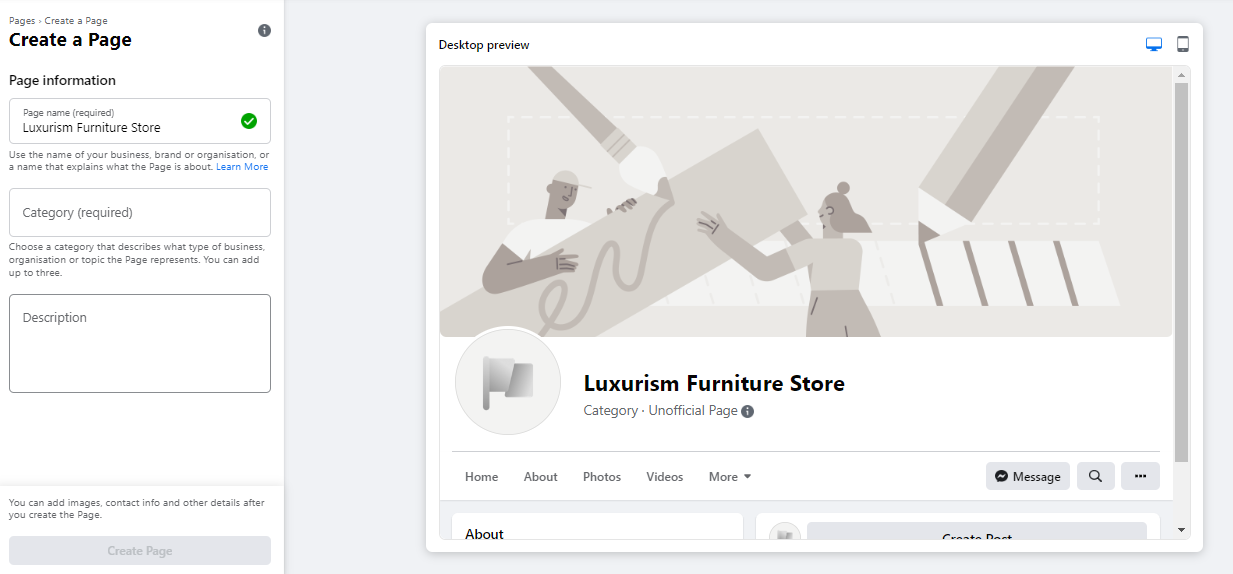
1. The Gateway: Initial Setup
Every business page must be tethered to a personal Facebook profile. This acts as the administrative "key." While your personal information remains strictly private and separate from the public-facing business entity, you must have an active profile to access the management tools.
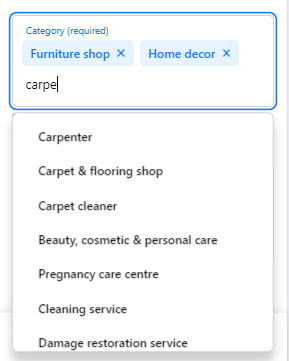
Visit facebook.com/pages/create to begin. As you input your business name and category, the platform provides a real-time preview. Aim for a name that mirrors your actual brand identity to ensure searchability. Select up to three categories that accurately describe your services, and craft a concise description (maximum 255 characters) that functions as your "elevator pitch" for search results.
2. Visual Identity and Branding
Visuals are the first point of contact for potential customers.
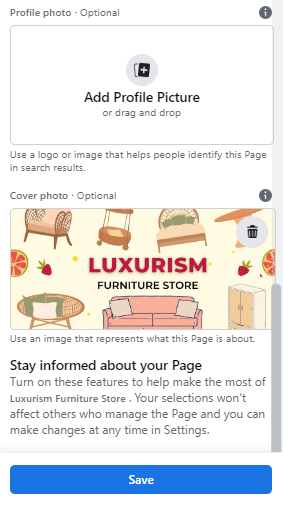
- The Profile Picture: This should be your logo or a professional headshot. It appears as a circular icon in all your interactions. Use a 180 x 180-pixel image, keeping critical branding elements away from the corners to avoid cropping issues.
- The Cover Photo: This is your primary billboard. At a recommended size of 1640 x 856 pixels, it should convey your brand personality or current promotional focus.
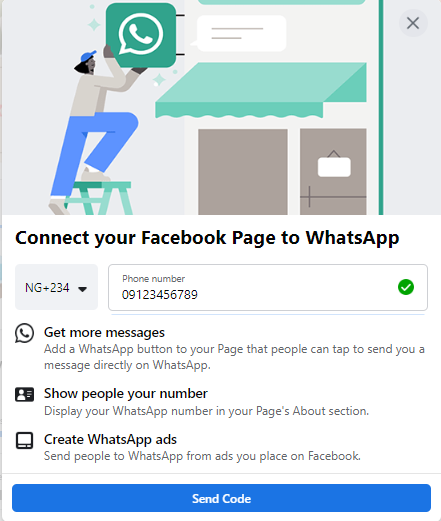
3. Optional Integrations: WhatsApp
Modern consumer behavior favors instant communication. Facebook allows you to link your business page to WhatsApp. While optional, this integration provides a "Message" button that routes inquiries directly to your WhatsApp Business app, significantly shortening the sales cycle.
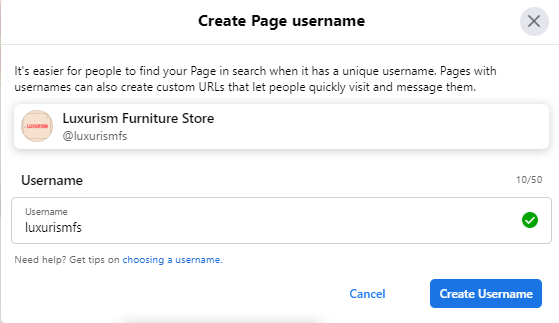
4. Establishing Your Vanity URL
Your username, or "vanity URL," is your digital address (e.g., facebook.com/yourbusiness). Keep it brief, memorable, and consistent with your handle on other social media platforms. Once verified, this makes your page significantly easier to share and find.
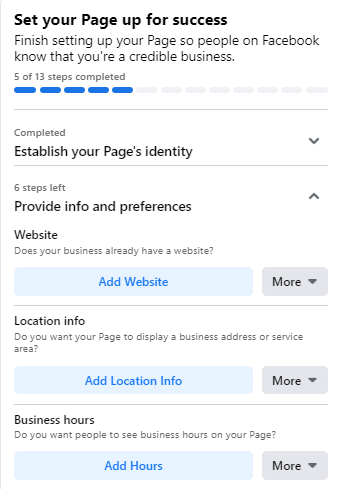
5. Populating the "About" Section
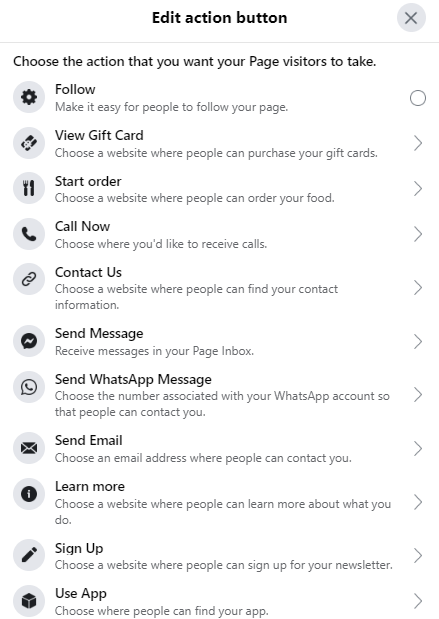
Never leave your About section blank. It is the first place potential customers go to verify legitimacy. Input your website, physical address, operating hours, and contact details. Additionally, configure your Call-to-Action (CTA) button. Whether you want users to "Shop Now," "Book Appointment," or "Download eBook," this button is the primary driver of conversion on your page.

6. The First Impression: Content
Before inviting your network, seed your page with content. A "ghost town" page discourages follows. Post a welcome message, share industry insights, or highlight a featured product. Use the "Create" tools to schedule events or job postings if applicable.
7. Inviting Your Network
Once your foundations are set, leverage your existing personal connections. Use the "Invite Friends" tool to broadcast your new page to your inner circle. Follow this by cross-promoting your page in your email signature, on your website, and through your other social media channels to jumpstart your follower count.
Supporting Data: Why Optimization Matters
The efficacy of a Facebook Page is not based on activity alone, but on optimized activity. Data suggests that pages utilizing "Insights" see a significantly higher return on investment. Insights provide granular data on:
- Reach: How many unique individuals saw your content.
- Engagement: The number of comments, shares, and reactions per post.
- Conversion Data: Tracking clicks on your CTA button, website link, and phone number.
By segmenting this data by age, location, and device, businesses can refine their content calendars to mirror the habits of their most valuable customers.
Official Guidance: The Power of Interaction
Facebook emphasizes that its platform is, at its core, a social space. Simply broadcasting messages is insufficient. To maximize your page’s authority:
- Pin Critical Content: Use the "Pin to Top" feature for new product launches or limited-time events.
- Engage as a Business: Interact with non-competing businesses in your niche. By "Liking" other pages as your business, you increase your visibility and build community credibility.
- Join Groups: Participate in relevant Facebook Groups as your page. This allows you to insert your brand into ongoing industry conversations, establishing your organization as a thought leader.
Implications for Future Growth
Creating the page is merely the beginning of a broader digital marketing journey. As your following grows, your requirements will evolve.
Leveraging Facebook Business Manager
For growing enterprises, the next logical step is moving beyond the standard Page interface to Facebook Business Manager. This platform allows for professional-grade management, where you can assign specific roles (such as Advertiser, Analyst, or Editor) to team members, freelancers, or external agencies without sharing personal login credentials.
The Role of Backlinks and SEO
Do not treat your Facebook Page as an island. Integrating links to your page on your official website and blog posts boosts your search engine ranking. Backlinks serve as a signal of authority to search engines, while simultaneously funneling traffic from your existing web presence to your social channels.
Templates and Tabs: Customization
Facebook offers specific templates for various business types (e.g., Services, Restaurants, Venues). These templates automatically reorder your tabs (About, Photos, Events, etc.) to prioritize the information most relevant to your industry. Regularly auditing these tabs ensures that your most important content is always front and center for the user.
Conclusion: The Path Forward
A Facebook Business Page is a dynamic, living asset. It requires regular maintenance, data-driven adjustments, and consistent engagement. By following the steps outlined above—from the initial technical setup to the strategic use of Insights and cross-platform promotion—you position your brand to thrive in an increasingly digital economy.

As you become more comfortable with the platform, remember that the goal is not just to collect "Likes," but to foster a community. Use your Page to solve customer problems, share your brand story, and provide tangible value. When you approach your Facebook presence with the same rigor you apply to your core business operations, the platform transforms from a simple social tool into a powerful engine for sustainable growth.
For those ready to scale, further resources such as Hootsuite’s suite of social management tools can help you streamline the process, allowing you to schedule content, monitor conversations, and analyze performance across multiple profiles from a single, centralized dashboard. The digital world is vast, but with a well-optimized Facebook Business Page, your brand is perfectly positioned to make its mark.