
In the high-stakes world of Pay-Per-Click (PPC) advertising, the difference between a high-performing campaign and a budget-draining disaster often comes down to timing. As a veteran PPC consultant, I have frequently observed that while clients obsess over keywords, ad copy, and landing page optimization, they often overlook the "low-hanging fruit" of efficiency: ad scheduling.
Commonly referred to in industry parlance as "dayparting," ad scheduling is the tactical practice of limiting your campaign delivery to specific hours of the day or days of the week. While the concept may initially sound restrictive—suggesting you might miss out on potential traffic—it is, in reality, a surgical approach to maximizing Return on Ad Spend (ROAS). By aligning your ad visibility with the moments your target audience is most active and primed to convert, you stop paying for "dead air" and start investing in high-intent engagement.
The Core Concept: What is Ad Scheduling?
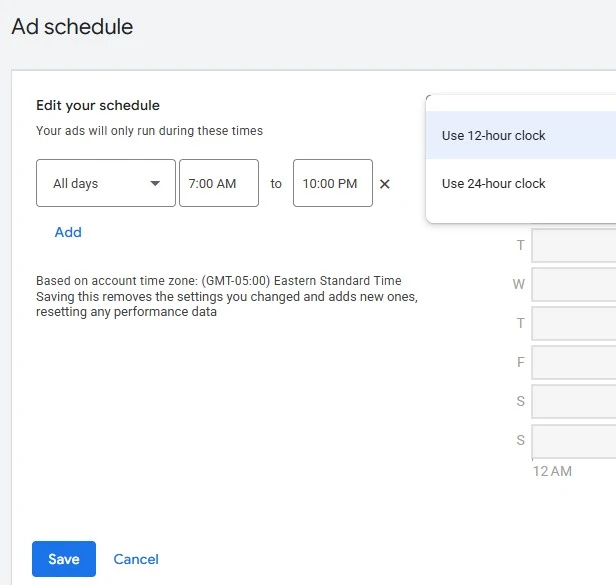
By default, most digital advertising platforms are configured to run campaigns 24/7. While this ensures continuous visibility, it rarely accounts for the reality of human behavior. Most businesses experience clear patterns in customer activity; for example, a B2B SaaS company might see a massive spike in demo requests during Tuesday morning business hours, while seeing near-zero engagement on a Sunday at 3:00 a.m.

Ad scheduling allows you to reclaim control from the platforms’ default "always-on" algorithms. By analyzing historical performance data, you can identify the "golden hours" for your brand and restrict your ad spend to those windows. If you determine that your conversion rate is significantly higher between 9:00 a.m. and 5:00 p.m. on weekdays, continuing to pay for clicks during the weekend is effectively throwing money away.
Historical Context and Evolution
"Dayparting" has its roots in traditional television and radio advertising, where airtime was sold in specific blocks based on peak viewership. When digital advertising arrived, the technology was initially crude, forcing advertisers to choose between being "always on" or manually pausing campaigns. Today, sophisticated automation in Google, Microsoft, and Meta Ads allows for granular, automated scheduling that operates in the background, ensuring your budget is deployed only when it is most likely to yield a return.
Strategic Implications: Why Precision Matters
The primary implication of implementing a robust ad schedule is the immediate reduction in wasted spend. However, the benefits extend beyond simple cost-cutting.
1. Granular Control in Automated Environments
One of the most frequent misconceptions is that modern automated campaign types, such as Google’s Performance Max (PMax), remove the need for human oversight. While these algorithms handle bidding and placement, they can be "black boxes" that overspend on low-quality traffic. Ad scheduling allows you to impose guardrails on these automated systems, ensuring that even if the algorithm is "learning," it is restricted to windows where your business is historically successful.
2. Strategic Bid Adjustments
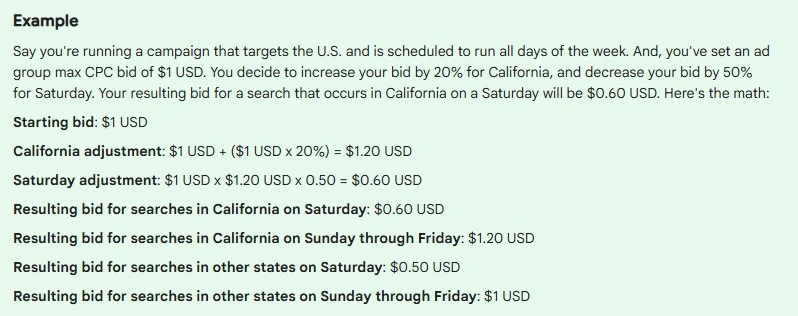
If you are hesitant to cut off your ads entirely, you can use ad scheduling to implement bid adjustments. Both Google and Microsoft Ads allow you to increase or decrease your maximum cost-per-click (CPC) based on the time of day. You might, for instance, set a 20% bid increase for your peak hours to ensure you win the top auction spot, and a 50% bid decrease for late-night hours where competition is lower but intent is also lower. This provides a "soft" version of dayparting that keeps your brand present while protecting your margins.
Implementation: A Tactical Guide
Setting up an effective ad schedule requires a data-first approach. You must move beyond gut feeling and rely on the performance data within your ad accounts.
Step 1: The Analytical Foundation
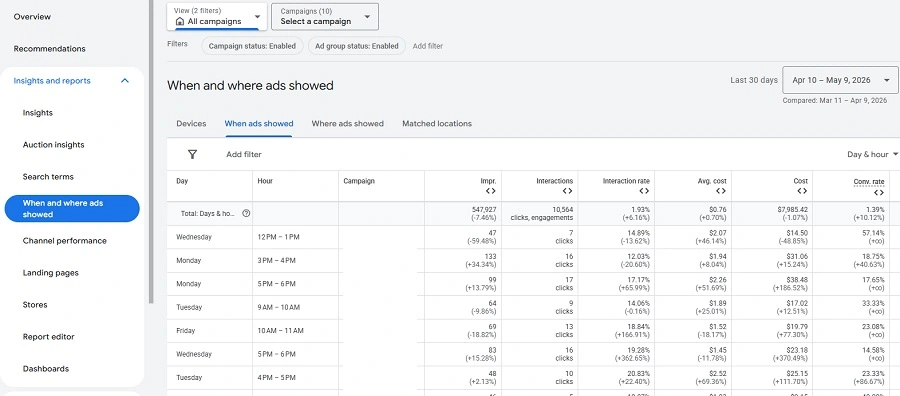
Before making any changes, you must audit your historical data. Within Google Ads, navigate to the "Reports" or "Ad Schedules" tab under "Audiences, Keywords, and Content." Look for:
- Conversion Rate by Hour/Day: Identify the specific times when your visitors are actually becoming customers.
- Cost Per Acquisition (CPA): Are there specific days where your CPA skyrockets?
- Impressions vs. Click-Through Rate (CTR): Are you getting high impressions at certain times but zero clicks?
Step 2: Navigating Time Zone Complexities
One of the most critical challenges in global or national campaigns is the time zone variable. Google Ads, for instance, operates based on the time zone of your account. If you are a business based in New York running ads in California, you must "stretch" your schedule to account for the three-hour difference. Failing to do the math means you may inadvertently shut off your ads for West Coast customers while they are still in their peak afternoon hours.
Step 3: Platform-Specific Nuances
Google Ads
Google requires manual scheduling at the campaign level. This is straightforward but requires consistent monitoring. If you run multiple campaigns, ensure your schedules are synchronized with your overall business objectives to avoid conflicting data.
Microsoft Ads
Microsoft offers a significant advantage over Google: the platform dynamically adjusts to the time zone of the searcher. This "heavy lifting" by the platform significantly reduces the math required for national or international campaigns. Furthermore, Microsoft allows for ad scheduling at both the campaign and ad group level, providing a level of granular control that exceeds Google’s default capabilities.
Meta (Facebook) Ads
Meta handles scheduling differently. The feature is tied directly to your budget type. You can only utilize dayparting if you select a "Lifetime Budget" for your ad set. Once this is set, you can navigate to the "Show More Options" tab in the budget section to define your delivery windows. Because Meta audiences are often global, this is a vital tool for ensuring your budget isn’t exhausted by an audience segment that is fast asleep.
Supporting Data: The Impact on Performance
Research consistently indicates that dayparting can improve overall campaign efficiency by 15% to 30%. In a recent case study of a mid-sized retail client, implementing a strict 8:00 a.m. to 8:00 p.m. schedule (avoiding late-night "window shoppers") resulted in a 22% reduction in CPA within the first 30 days.
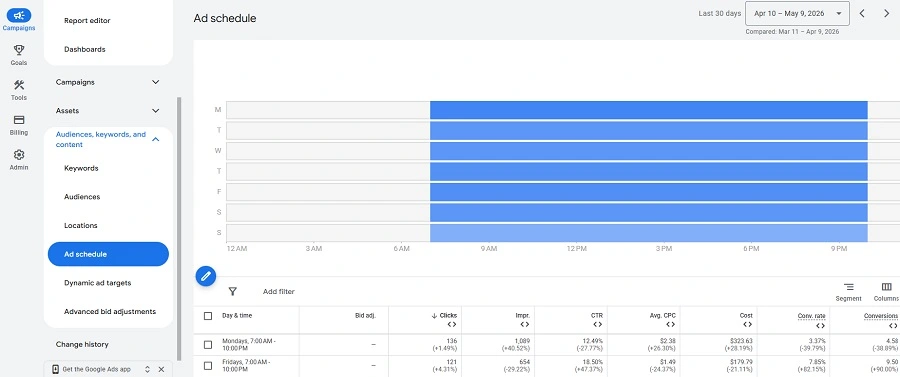
Furthermore, businesses that utilize bid adjustments during peak hours see an average increase in conversion volume of 10% compared to those using a flat bidding strategy. The data is clear: the market is not uniform, and your advertising spend should not be either.
Official Guidance and Best Practices
Industry leaders, including Google’s own support documentation, suggest that while ad scheduling is powerful, it should be approached with caution.
Official Recommendation:
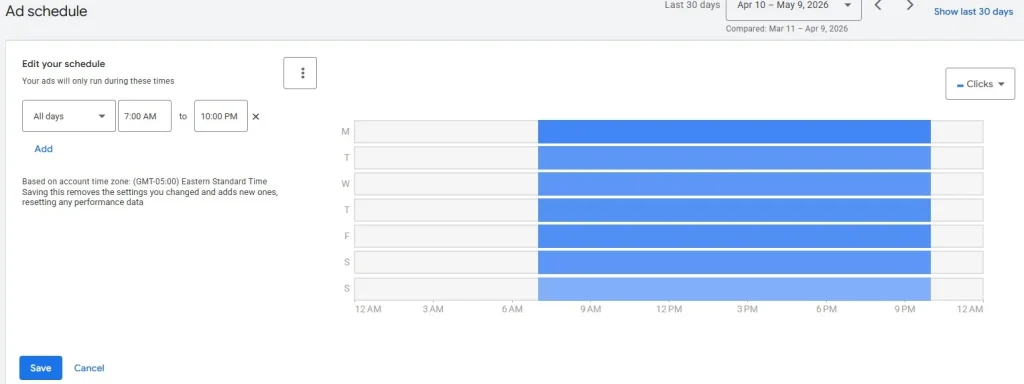
- Avoid over-segmentation: If you create too many narrow, overlapping schedules, you may find it difficult to scale your campaigns or analyze performance effectively.
- Test and Learn: Treat your ad schedule as a living document. Start by identifying the "worst" hours—the times when your CPA is highest—and pause those first. Monitor the results for 14–30 days before making further adjustments.
- Account for Seasonality: Remember that customer behavior during the holidays, or even during specific sale events, may differ from your "typical" data. Periodically reset your schedules to ensure they reflect current consumer trends.
Final Implications: The Competitive Edge
In an increasingly crowded digital marketplace, the ability to squeeze maximum value out of every dollar is a competitive necessity. Ad scheduling is not merely a "hack" to save money; it is a fundamental pillar of professional account management.
By shifting your mindset from "constant visibility" to "strategic presence," you align your brand with the needs and habits of your customers. Whether you are a small business owner looking to protect a limited budget or a marketing manager handling a high-six-figure account, the application of ad scheduling will provide a clearer picture of your performance, a more efficient use of your resources, and ultimately, a healthier bottom line.
As you move forward, remember that the most effective PPC accounts are those that evolve. Use your historical data, respect the platform-specific constraints, and don’t be afraid to let your ads rest when your customers are resting. Your budget—and your ROAS—will thank you.