
The lifeblood of any subscription-based business model is the seamless, predictable flow of recurring revenue. However, as any seasoned e-commerce merchant knows, the reality of managing thousands of recurring transactions is rarely "set it and forget it." Between payment gateway tokenization, varying customer preferences, and the technical complexities of server-side background processes, managing subscriptions at scale can often feel like a game of whack-a-mole.
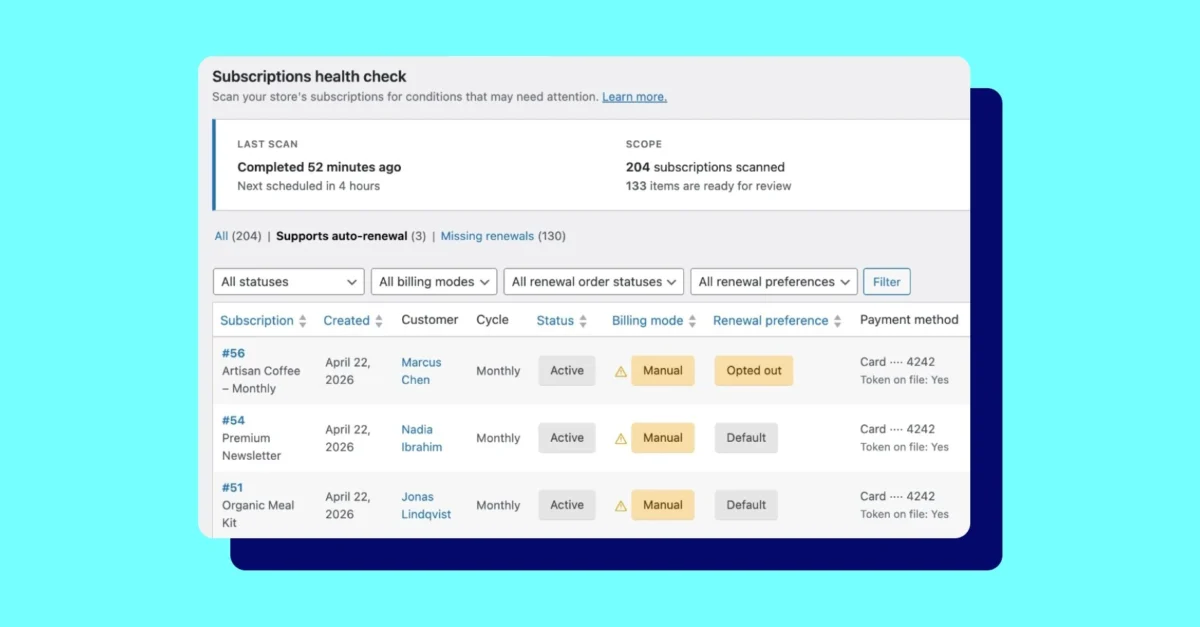
Recognizing the need for greater transparency and administrative control, the team behind WooCommerce Subscriptions has officially launched a powerful new diagnostic tool: The Subscriptions Health Check. Designed to illuminate the "hidden" status of your recurring billing ecosystem, this tool aims to bridge the gap between technical configuration and actual revenue performance.
Main Facts: What is the Subscriptions Health Check?
The Subscriptions Health Check is a dedicated administrative dashboard located within the WordPress environment, specifically under WooCommerce > Status > Subscriptions. At its core, the tool acts as a "visibility layer" for store owners, allowing them to see exactly which subscriptions are operating optimally and which ones may be silently failing or underperforming.
In the world of WooCommerce, flexibility is a primary value proposition. Merchants can offer manual renewals, automatic billing, bank transfers, and customer-controlled billing cycles. While this versatility is excellent for the end consumer, it creates a complex backend environment where tracking the "why" behind a failed or missed renewal can be time-consuming.
The Health Check tool simplifies this by surfacing critical data points that were previously buried in logs or database queries. It does not automate changes to your store—a design choice made to ensure merchants maintain full control over their customer relationships—but instead provides the actionable insights necessary to make informed decisions.
Chronology of Development: Why Now?
The release of the Subscriptions Health Check follows a long period of internal development focused on addressing the most common "friction points" reported by high-volume merchants.
The Evolution of Visibility
Historically, merchants relied on third-party plugins or manual SQL database checks to identify why specific subscriptions weren’t renewing. This created a barrier to entry for smaller store owners and a technical burden for larger operations.
- Phase 1 (The Discovery): The Woo engineering team observed that many support tickets regarding "missing revenue" were actually related to configuration mismatches (e.g., a customer having a tokenized payment method on file, yet the subscription was set to manual renewal).
- Phase 2 (The Prototype): The team began building internal diagnostic tools to assist the Happiness Engineering team in troubleshooting store issues more rapidly.
- Phase 3 (The User-Facing Release): Recognizing that merchants needed these insights directly within their dashboard, the team formalized these diagnostic checks into the user-facing Health Check tool currently rolling out to all users of the latest WooCommerce Subscriptions update.
Supporting Data: Understanding the Two Key Views
The tool is currently built around two primary diagnostic views, each targeting a specific type of operational hurdle.
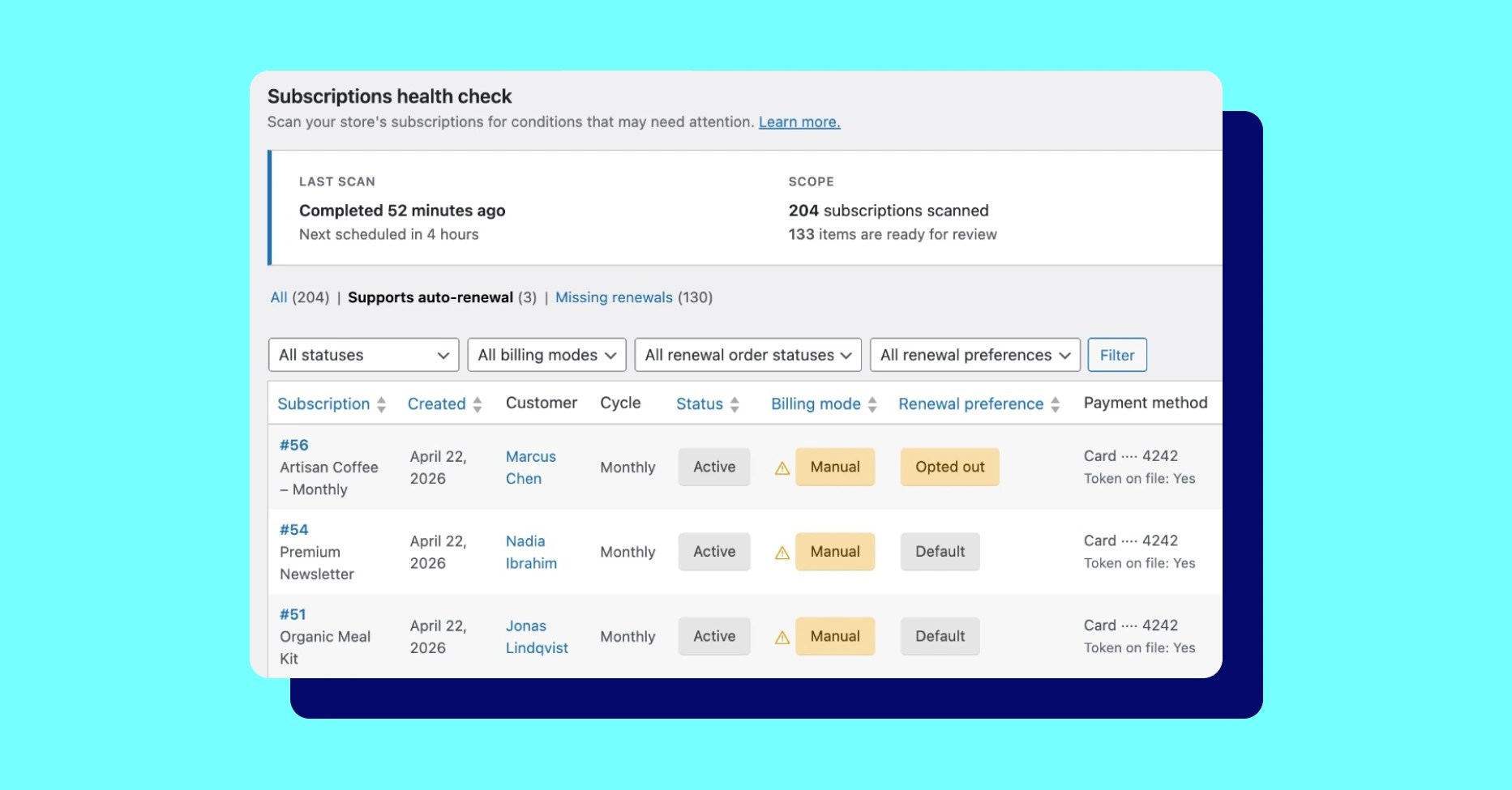
View 1: The "Supports Autorenewal" Diagnostic
One of the most common revenue leaks in subscription commerce occurs when a customer has a valid payment token on file, but the subscription itself is configured for "manual renewal."
- The Issue: Many merchants update their store settings to encourage automatic renewals, but these changes do not retroactively apply to existing subscriptions. Consequently, a segment of the customer base may continue to receive manual invoices, leading to higher churn rates and lower customer lifetime value (CLV).
- The Insight: The Health Check identifies these "orphaned" subscriptions. It highlights cases where the infrastructure for automation exists (the token), but the setting is currently set to manual.
- The Context: The tool provides metadata explaining why the subscription is manual—whether it was a customer choice, an older store-level configuration, or a legacy setting. This allows the merchant to decide whether to reach out to the customer to enable automation or to leave it as a manual preference.
View 2: The "Missing Renewals" Diagnostic
This view is the "early warning system" for technical issues. If a subscription is scheduled to renew but the action never triggers, the revenue is lost.
- The Issue: Data integrity is a common challenge in high-traffic stores. Conflicts with the Action Scheduler, server timeouts, or bugs in third-party integrations can occasionally cause a subscription renewal to "hang" or fail silently.
- The Insight: This view aggregates subscriptions that have missed their expected renewal dates. It allows store managers to isolate problematic subscriptions from the noise of a healthy store, providing a targeted list for investigation.
- The Goal: By identifying these gaps in real-time, merchants can proactively troubleshoot the root cause—whether it be a plugin conflict or a server resource issue—before it impacts the monthly recurring revenue (MRR) report.
Official Responses: Guidance from the Woo Product Team
Tim Crepeau, a member of the Payments product team at Woo, emphasizes that this tool is not intended to be a "set-it-and-forget-it" automated fix.
"Our goal is to provide you with an ongoing, reliable read on your subscription health," Crepeau explains. "The tool doesn’t make changes automatically. It gives you the information; what you do with that is up to you. We encourage store owners to review flagged subscriptions individually, as some variations in configuration are intentional and necessary for specific customer needs."
The philosophy behind this release is informed autonomy. By presenting the data, WooCommerce empowers the merchant to act as the final arbiter of their business rules. If a merchant sees a customer who has been manually renewing for years, they may decide to keep them on that path to preserve a positive relationship, even if the system flags them as "capable of autorenewal."
Implications for E-commerce Operations
The introduction of the Subscriptions Health Check has significant implications for how merchants manage their growth:
1. Reduced Churn through Optimization
By identifying subscriptions that should be on autorenewal but aren’t, merchants can convert "manual" payers into "automatic" subscribers. This is one of the most effective ways to lower churn, as it removes the friction of the customer needing to log in and pay an invoice every cycle.
2. Improved Financial Accuracy
For finance teams, "missing renewals" can create significant headaches during end-of-month reconciliation. Having a dashboard that clearly displays failed or stalled renewals allows for cleaner accounting and more accurate revenue forecasting.

3. Proactive Technical Troubleshooting
In the past, a merchant might only realize there was a recurring billing issue when a customer complained or when they noticed a dip in their monthly dashboard. With the Health Check, the "time-to-detection" for technical issues drops significantly. If the tool shows a spike in "Missing Renewals," it acts as an immediate signal that a recent update or change to the site has negatively impacted the payment pipeline.
4. A Foundation for Future Scalability
The team has made it clear that these two views are just the beginning. As the tool matures, it is expected that more diagnostic "views" will be added, potentially covering areas like payment method expiration, regional tax compliance flags, and integration-specific health indicators.
How to Get Started
To begin using the tool, merchants should follow these steps:
- Update: Ensure you are running the latest version of the WooCommerce Subscriptions plugin. Check the Updates section in your WordPress dashboard to verify you are on the current release.
- Navigate: Go to your WP Admin dashboard and select WooCommerce > Status > Subscriptions.
- Review: Spend time exploring both the "Supports Autorenewal" and "Missing Renewals" tabs. Take note of any flagged subscriptions.
- Engage: If you find data that you don’t understand, or if the tool highlights a widespread issue that seems to be a result of a system bug rather than a user setting, contact the WooCommerce Happiness Engineering team. They are equipped to help you interpret the findings and suggest the appropriate technical fixes.
Conclusion: The Future of Subscription Health
The subscription economy is built on trust and reliability. When a customer signs up for a service, they expect it to work without interruption. Conversely, when a business offers a service, they need the financial assurance that their systems are processing transactions correctly.
By bringing these critical insights to the forefront, WooCommerce is taking a proactive step in helping its massive user base scale their businesses with confidence. The Subscriptions Health Check is more than just a diagnostic dashboard; it is a commitment to the stability of the recurring revenue model. As the tool continues to evolve, it will undoubtedly become a staple for any merchant serious about maintaining a healthy, high-performing e-commerce store.
Whether you are a small boutique shop or a large-scale subscription enterprise, the ability to see the "health" of your recurring billing is a game-changer. Take the time to audit your store today—you might be surprised by what the data reveals.