For any digital marketer, there is arguably no greater frustration than the "dead zone" of Facebook Ads Manager. You have meticulously crafted your creative assets, defined your target demographics, and allocated a healthy budget—yet, when you hit the dashboard, the delivery column displays a flat, discouraging zero. The "Not Delivering" status is more than a technical hurdle; it is a direct interruption to your revenue pipeline.
When your ads fail to gain traction, it is rarely an arbitrary glitch. Facebook’s delivery system is a sophisticated machine driven by complex algorithms, auction dynamics, and strict policy enforcement. Understanding why this engine stalls is the first step toward restoring your campaign’s momentum.
The Anatomy of "Not Delivering"
At its core, when an ad status shows "Not Delivering," it indicates that the platform has ceased serving your content to the target audience. Consequently, your impressions remain stagnant, and your potential reach vanishes.
This status is often accompanied by a sub-status—most commonly "Update Required"—which acts as a diagnostic flag. Whether you are launching a brand-new campaign or a long-running evergreen ad that has suddenly gone silent, the issue is typically rooted in one of ten specific areas. By methodically checking these, you can pivot from frustration to resolution.
1. The Disconnected Post: When Your Asset Vanishes
A common, yet frequently overlooked, cause of delivery failure is the unavailability of the underlying post or media asset associated with your ad. If the organic post you chose to "boost" has been deleted, archived, or had its privacy settings modified by an administrator, the ad engine loses its anchor.
The Fix
The most efficient path to resolution is to audit your creative assets. Navigate to the Ad level in your Ads Manager. Check the post ID or the specific media file being used. If the post is no longer public, you may need to re-publish it, update the page permissions to ensure the Ad Account has the necessary access, or simply select a fresh, active post to serve as the creative base. Once the asset is verified as "Live," toggle your ad set back to "Active."
2. The Bottleneck of the Review Process
Facebook’s commitment to safety and policy compliance necessitates a rigorous review process for every ad. This involves both automated machine-learning scans and, in many cases, manual human oversight.
The Reality of Review Timelines
While Facebook officially states that most ads are reviewed within 24 hours, this is a guideline rather than a guarantee. During high-traffic periods—such as Black Friday, Cyber Monday, or major holidays—the queue can become severely backlogged, leading to delays that exceed the 24-hour mark.
The Fix
To mitigate the risk of a "dead" launch day, always schedule your campaigns at least 48 to 72 hours in advance. This buffer allows the review team ample time to process your assets without forcing your campaign to sit idle. Crucially, avoid making major edits to ads while they are in the "In Review" stage. Any modification—be it a change to the landing page URL, a tweak to the ad copy, or a shift in the creative—triggers a full restart of the review process.
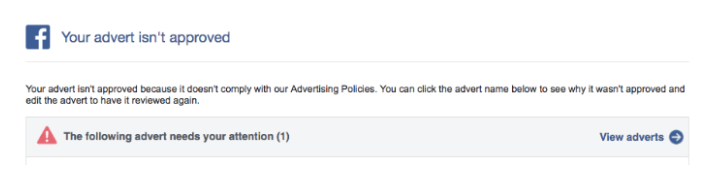
3. Policy Rejection and Compliance Hurdles
If your ad violates Facebook’s Advertising Policies, it will be rejected, and delivery will be halted immediately. This is perhaps the most common source of frustration for new advertisers.
Common Pitfalls
Facebook’s automated systems are highly sensitive to:
- Prohibited Content: Promoting restricted items, deceptive claims, or adult content.
- Personal Attributes: Implying knowledge of a user’s personal traits (e.g., "Are you suffering from [medical condition]?").
- Misleading Landing Pages: If the destination website does not align with the ad’s claims, Facebook will flag the ad as deceptive.
The Fix
Review the email notification sent to your Business Manager for the specific reason for rejection. If the error is minor (e.g., profanity or a broken link), correct the asset and resubmit. If you believe the rejection was a systemic error, utilize the Account Quality dashboard to file an appeal. Providing clear, concise documentation for your appeal significantly improves your chances of a reversal.
4. Hitting the Account Spending Limit
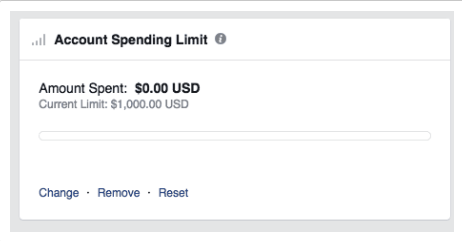
Often, marketers set an "Account Spending Limit" during the setup phase of a new business manager to prevent runaway costs, only to forget that the limit exists. Once your account hits this cumulative total, all campaigns are automatically paused, regardless of their individual performance.
The Fix
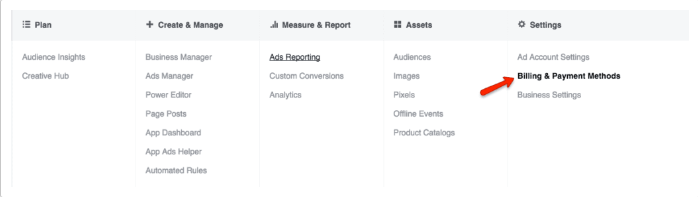
This is a simple administrative fix. Navigate to Billing and Payment Methods within your Ads Manager. In the "Account Spending Limit" section, you can view your current threshold. From here, you can increase the limit, reset it entirely, or remove it to ensure future continuity.
5. Bid Caps and Budget Constraints
Facebook operates on an auction system. If your daily budget is too low, the algorithm may struggle to find sufficient data to optimize effectively. Even worse, if you utilize a "Bid Cap" that is set too low for the current market competition, your ads will simply lose every auction, resulting in zero delivery.
The Fix
Shift your strategy toward a "Lowest Cost" (automated) bid approach initially. This allows the system to find the optimal bid price for your target audience without human interference. If you must use manual bidding, ensure your bid cap is significantly higher than the estimated cost-per-action to remain competitive. For smaller budgets, consider switching to a "Lifetime Budget," which allows Facebook to distribute your spend more intelligently over the duration of the campaign.
6. The "Hyper-Niche" Audience Trap
While targeting is essential, there is a point of diminishing returns. Facebook’s algorithm requires a minimum pool of data to identify who will engage with your content. If you restrict your audience size too aggressively, you leave the algorithm with no room to move.
The Fix
Expand your parameters. If you have layered too many interests, demographics, and behaviors, begin removing them one by one. Aim for a broader audience, and let the algorithm’s machine learning identify the high-converting segments naturally.
7. The Collision of Audience Overlap
When you run multiple ad sets targeting similar audiences, you may be forcing your own ads to compete against one another. This is known as "Auction Overlap." Facebook prevents this by pausing the ad sets with the lowest "Total Value" to protect the user experience and your budget.
The Fix
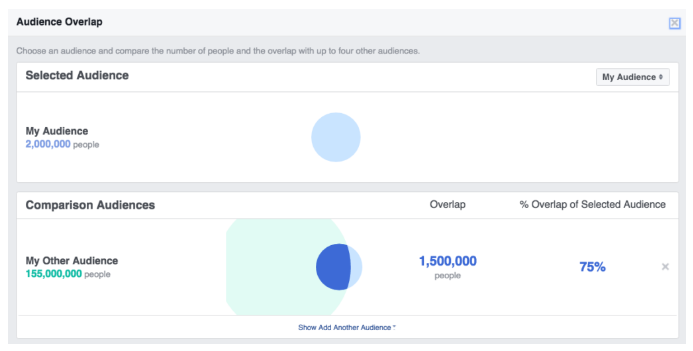
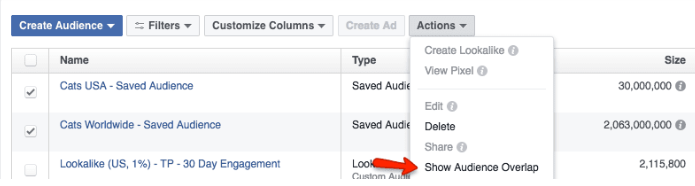
Use the Audience Overlap Tool within the "Audiences" tab. By comparing your ad sets, you can visualize the percentage of overlap. If it exceeds 20-30%, consider merging the ad sets into a single, larger group or refining your targeting to ensure the two groups are distinct.
8. Low Engagement and Ad Relevance
Facebook prioritizes user experience. If your ads have low relevance scores, high bounce rates, or are receiving negative feedback (users clicking "Hide Ad"), the platform will throttle your delivery.
The Fix
Analyze your Ad Relevance Diagnostics. Focus on the "Quality Ranking," "Engagement Rate Ranking," and "Conversion Rate Ranking." If these are "Below Average," your creative is likely failing to resonate. Refresh your imagery, simplify your messaging, and ensure your landing page is mobile-optimized and fast-loading.
9. Scheduling Inconsistencies
Campaigns often go dormant simply because they were never meant to be active at that moment. A "Paused" status, an expired end date, or a campaign set to launch in the future are frequent culprits.
The Fix
Review your campaign level settings. Check the start and end dates carefully. Ensure that your time zone settings in Business Manager align with your actual location to avoid "Dayparting" errors where ads only run while you are asleep.
10. The Conversion Goal Paradox
Finally, optimizing for a conversion that rarely happens—such as a "High-Ticket Purchase"—can starve your ad of data. If your pixel doesn’t record enough conversions, the algorithm cannot "learn" who your ideal customer is.
The Fix
Move up the funnel. If you aren’t getting enough purchases to sustain delivery, switch your optimization goal to "Add to Cart" or "Link Clicks." Once the algorithm builds a reliable pool of data and you start seeing consistent traffic, you can graduate back to optimizing for the final conversion.
Implications for Future Strategy
A failure in delivery is not merely a technical error; it is a signal. It tells the advertiser that the current configuration—be it the budget, the audience, or the creative—is out of sync with the platform’s requirements.
By adhering to a disciplined process of audit and adjustment, marketers can move past these roadblocks. Success in Facebook advertising is rarely about "hacking" the system; it is about providing the system with the right data, the right budget, and the right creative to do the work for you. When you align your goals with the platform’s mechanics, you turn the "Not Delivering" nightmare into a consistent, scalable growth engine.