In the modern digital ecosystem, the "vanity metric" era is rapidly fading. For years, brand success on social media was measured in likes, shares, and follower counts—data points that reside comfortably within the walled gardens of platforms like Instagram, LinkedIn, and X. However, as marketing budgets face increasing scrutiny, these internal metrics are no longer sufficient to justify investment. The critical question for CMOs and marketing managers today is no longer "How many people saw this?" but rather "How many people clicked through to our website and converted into customers?"
Bridging this gap requires moving beyond native platform insights and integrating social media performance into your broader web analytics strategy, primarily through Google Analytics 4 (GA4).
The State of Social Measurement: A Disconnect
Despite the ubiquity of social media, a profound measurement gap remains. According to the 2025 Impact of Social Media Marketing report, a staggering 56% of marketing leaders do not consider their teams to be experts in measuring the business impact of their social efforts. This is a precarious position, given that social media is a primary driver of web traffic. Global data indicates that social media accounts for approximately 10.12% of total website traffic, a figure that jumps to 15.23% in socially mature markets like the United States.
When social teams operate in silos, they lose the ability to prove their value. By integrating GA4, marketers can transform social media from a top-of-funnel awareness tool into a measurable engine for revenue and lead generation.
Why GA4 is the Gold Standard for Social Attribution
Google Analytics acts as the "source of truth" that aligns social activity with organizational KPIs. While social platforms are excellent at telling you who engaged with a post, GA4 tells you what that user did after they arrived at your doorstep.
Aligning Social to Business Goals
Marketing leaders are under constant pressure to justify expenditures. The 2025 Sprout Social Index™ highlights that 65% of leaders identify the ability to link social performance to business outcomes as the primary requirement for securing increased budgets.
By utilizing GA4, you can move away from abstract metrics and toward concrete business outcomes. You can track how visitors from specific channels (e.g., LinkedIn vs. TikTok) interact with your pricing pages, download whitepapers, or initiate checkout processes. This alignment ensures that your social strategy is not just creating noise, but actively contributing to the bottom line.

Deepening Audience Intelligence
GA4 provides a window into the "post-click" behavior of your audience. You can analyze which social platforms attract the most high-intent visitors—those who spend more time on site, view more pages, or complete high-value actions. This data allows you to pivot your content strategy, shifting resources toward the platforms that produce the highest quality traffic rather than just the highest volume.
Decoding GA4: Organic vs. Paid Social
To effectively measure performance, one must understand how GA4 categorizes incoming traffic. GA4 uses a sophisticated, rule-based system to sort social traffic into two distinct buckets:
- Organic Social: This captures traffic where the visitor arrives via non-ad links. GA4 identifies this through a regex list of recognized social domains or by identifying specific URL parameters (mediums like "social," "social-network," or "sm").
- Paid Social: This category is reserved for traffic arriving via sponsored content. It requires the source to match a social site, but the medium must contain specific indicators of paid effort, such as "cp" (cost-per-click), "ppc," "retargeting," or "paid."
Understanding this distinction is vital for accurately calculating Return on Ad Spend (ROAS). Without proper categorization, you risk inflating the perceived effectiveness of your organic strategy with results that were actually purchased through ad spend.
The Vital Role of UTM Parameters
If GA4 is the engine, UTM (Urchin Tracking Module) parameters are the fuel. UTMs are snippets of text appended to the end of your URLs that provide GA4 with specific metadata about where a click originated.
Why Manual Tracking is a Trap
While the utility of UTMs is undisputed, the implementation is often where teams fail. Managing dozens of posts across multiple platforms using manual spreadsheets is a recipe for error. Misspelled parameters or inconsistent naming conventions can render your data useless, leading to "ghost traffic" that cannot be attributed to a specific campaign.
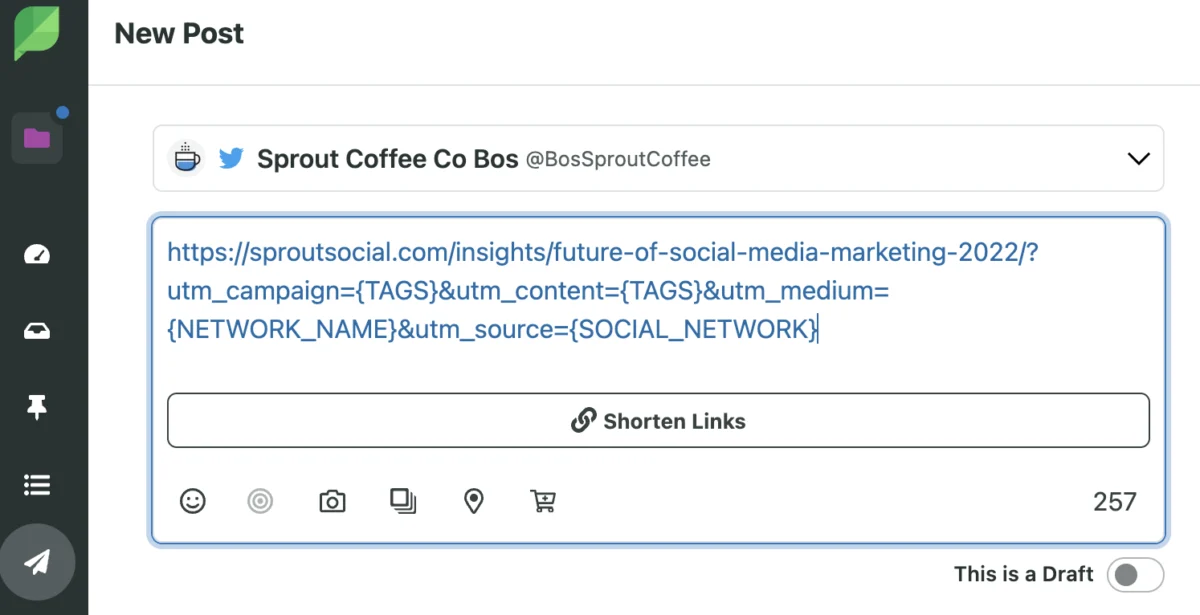
Modern solutions, such as Sprout Social’s integration with Bitly, have revolutionized this workflow. By enabling one-click URL shortening and automated UTM tagging during the scheduling process, marketers can ensure that every post is perfectly tracked without the administrative burden of manual spreadsheet maintenance.
Essential Metrics for the Data-Driven Marketer
To demonstrate ROI, you must look beyond surface-level clicks. Here are the four critical data points to monitor in GA4:

- Demographics: Beyond simple vanity metrics, GA4 allows you to see the age, language, and location of users who actually interact with your site. Does your social content attract your target persona, or are you capturing traffic that doesn’t convert?
- Session Source/Medium: This allows for a granular view of platform performance. Which social network is the most efficient driver of traffic for your specific niche?
- Engaged Sessions: This is the antidote to the "accidental click." GA4 defines an engaged session as a visit that lasts longer than 10 seconds, results in a conversion, or involves viewing two or more pages. This is the primary metric for gauging the true quality of your social traffic.
- Average Engagement Time: This measures the depth of the user experience. If your social post promises a deep dive into a subject, but your average engagement time is under five seconds, there is a disconnect between your social hook and your landing page content.
Measuring Conversions and Proving ROI
The pinnacle of social media reporting is the "Key Event." Previously referred to as conversions, key events in GA4 are specific actions that represent tangible value to your organization.
Setting Up Your Success Funnel
Whether your goal is a newsletter sign-up, a demo request, or an e-commerce purchase, you can designate these actions as key events.
- Event Tracking: Ensure that your website is correctly firing events (e.g.,
sign_uporpurchase) when a user takes action. - Configuration: Navigate to the Admin section of GA4 and mark these specific events as "Key Events."
- Attribution: Once enabled, GA4 will attribute these conversions back to the source/medium, allowing you to see exactly which social campaigns generated the most revenue.
Implications for Future Strategy
The move toward data-integrated social measurement is not merely a technical upgrade; it is a cultural shift in how marketing departments function. As we look toward the future, the ability to correlate social media performance with business growth will become the primary differentiator between successful brands and those that stagnate.
By leveraging GA4, organizations can build a closed-loop system where social insights inform website design, and website performance informs social content strategy. This cycle of continuous improvement is the only way to navigate an increasingly complex digital landscape.
For teams looking to scale, the integration of social management tools like Sprout Social with robust analytics platforms like GA4 is no longer optional—it is a competitive necessity. By automating the technical heavy lifting of link tracking and providing a centralized view of business outcomes, marketers can finally step away from the vanity metrics and focus on what truly matters: driving sustainable, measurable growth.