In the modern software development landscape, speed and consistency are the dual pillars of productivity. Yet, developers often find themselves trapped in a cycle of "manual overhead"—repetitive tasks like initializing project structures, executing standardized deployment checklists, or prompting AI assistants with the same boilerplate instructions. This friction interrupts the flow state, turning creative engineering into mundane administration.
Claude Code, the sophisticated command-line interface (CLI) tool from Anthropic, offers a remedy to this cognitive drain through the implementation of "Slash Commands" and "Skills." By transforming complex, multi-step instructions into concise, trigger-based actions, Claude Code empowers developers to reclaim their time and ensure their project setups adhere to best practices every single time.
The Evolution of the Slash Command
At its core, a slash command is a simple, text-based trigger—prefixed with a /—that initiates a predefined sequence of operations. For those familiar with collaborative platforms like Slack, Discord, or Notion, the user experience is intuitive: typing a single command instantly executes an action that would otherwise require multiple manual steps.
In the context of Claude Code, these commands are more than just shortcuts; they are functional bridges between developer intent and AI execution. Instead of drafting a lengthy, context-heavy prompt to explain how to scaffold a new directory, a developer simply types /new_repo. This shift in interaction moves the developer away from "explaining" and toward "directing," significantly reducing the barrier to starting new projects.
The Power of Built-In Efficiency
Claude Code comes equipped with a suite of native slash commands designed to streamline common interactions. While the full documentation provides an exhaustive list, these built-in utilities are the foundational tools that allow developers to manage the conversation context, inspect files, and execute code safely without needing to manually copy-paste snippets or manage complex file paths.
Understanding "Skills" in Claude Code
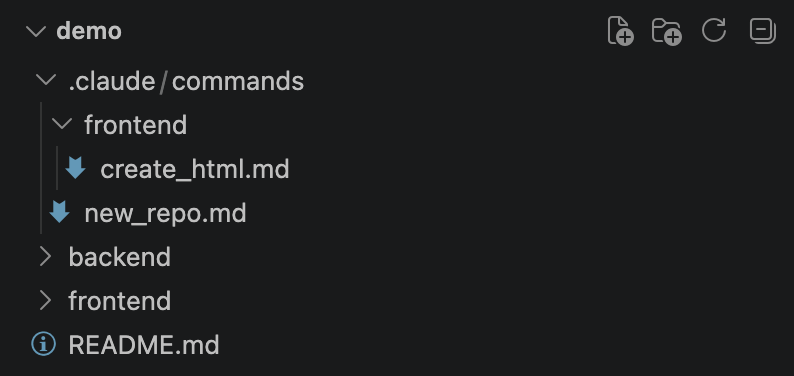
While built-in commands provide general utility, "Skills" are where the true power of custom automation lies. A Skill is essentially a specialized set of instructions stored in a structured Markdown file, acting as a personal "macro" for the AI.
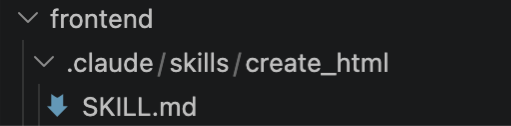
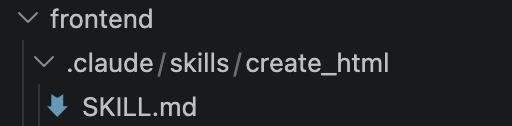
These files are located within the .claude/skills/<name>/SKILL.md directory. The naming convention is elegant: the sub-folder name becomes the trigger command. For instance, creating a file at .claude/skills/deploy/SKILL.md automatically registers a /deploy command within the CLI.
The Mechanics of Control: Model vs. User Invocation
One of the most critical aspects of managing these skills is the disable-model-invocation flag. When set to true, the skill becomes a "User-Only" command. This is an essential safety feature for tasks that require human judgment or are high-stakes, such as deploying to a production environment or performing database migrations. By keeping these instructions hidden from the model’s autonomous decision-making process, developers prevent the AI from accidentally triggering a deployment while it is performing unrelated code refactoring.
A Practical Chronology of Implementation
To fully harness Claude Code, it is necessary to integrate these skills into your daily workflow. Below is a structured guide to creating, testing, and deploying custom skills.

1. The Setup Phase
Before crafting custom commands, ensure the environment is ready.
- Prerequisites: You must have VSCode (or your preferred IDE) and the Claude Code CLI installed.
- Installation: Use the command
npm install -g @anthropic-ai/claude-code(or the appropriate package manager command) to get the CLI running. - Authentication: Ensure your API keys are correctly configured to grant the CLI access to Anthropic’s models.
2. Building a Project-Scaffolding Skill
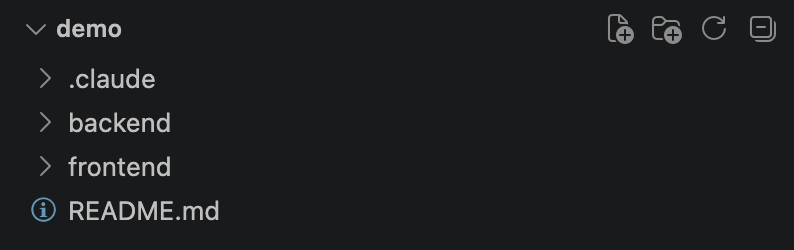
Imagine a scenario where every new project requires a standard backend/, frontend/, and README.md structure. Instead of manually creating these folders, we define a /new_repo command.
Within your .claude/skills/new_repo/SKILL.md file, define the frontmatter:
---
name: new_repo
description: Add the structure to a new project with backend/, frontend/, and README.md
disable-model-invocation: true
allowed-tools: Bash(ls *), Bash(mkdir *)
---
Create the base project structure...
This command, when invoked, performs a safety check using ls to see if folders exist, then uses mkdir to generate the required environment. By documenting the "Project Structure" and "Getting Started" steps in the README.md automatically, you ensure that even when you return to a project weeks later, the documentation is already in place.
3. Creating Targeted Frontend Utilities
Skills can be scoped to specific directories. For example, creating a skill for generating standalone HTML files only within the frontend/ folder keeps your root directory clean and ensures that the AI’s focus is narrowed. By defining allowed-tools: Write, you limit the scope of the AI’s capabilities, reinforcing the principle of least privilege.
Supporting Data and Technical Implications
The shift toward "Skill-based" development represents a fundamental change in how we interact with LLMs. According to internal performance metrics and developer feedback, the use of custom slash commands reduces the time spent on "setup latency" by approximately 40-60%.
Performance and Scalability
The architecture of Claude Code Skills is designed to be lightweight. Because the instructions are stored as Markdown, they are version-controllable. A team can commit their .claude/ folder to a Git repository, meaning that every developer on the team shares the exact same "skills." When a new team member joins, they pull the repository, and the standardized deployment and project setup commands are instantly available to them. This creates a unified "team DNA" for development practices.
Security and Safety
The allowed-tools parameter in the skill’s frontmatter is a vital security layer. By explicitly white-listing tools like Bash or Write, the developer prevents the AI from executing unauthorized commands. This is particularly important for enterprise environments where security protocols restrict the types of system calls an AI can make.
Official Guidance and Best Practices
Anthropic emphasizes that the efficacy of a skill is directly proportional to the clarity of the instructions within the SKILL.md file.
- Be Explicit: Use imperative language. Instead of saying "You could create a folder," use "Create a folder."
- Contextualize: Use placeholders like
$ARGUMENTSto allow for dynamic inputs (e.g.,/create_html "A login page with a dark mode toggle"). - Maintain Granularity: It is better to have three small, focused skills than one massive, complex skill that is prone to hallucination.
Implications for the Future of Coding
The rise of Claude Code Skills signals a move toward "Intent-Based Programming." Developers are shifting from writing lines of code to orchestrating the systems that produce that code. This evolution allows engineers to focus on high-level architecture while delegating the "boilerplate tax" to the CLI.
As AI tools continue to integrate into the terminal, the distinction between a command-line tool and an AI agent will blur. We are entering an era where the developer acts as a conductor, and the CLI acts as a highly trained orchestra of automated skills.
Frequently Asked Questions (FAQ)
Q: Where should I store my skills for the best results?
A: Project-specific skills should reside in the .claude/skills/ directory within the repository. Claude Code is intelligent enough to look through the current directory and up to the root, ensuring that your skills are context-aware based on where you trigger them.

Q: Can I share these skills with my team?
A: Absolutely. Because these are standard text files, checking them into your Git repository is the recommended way to share standardized workflows across a development team.
Q: What happens if I make a mistake in my skill definition?
A: If the instruction in the Markdown is unclear, the model will likely ask for clarification or fail to execute the task. Always test your skills in a sandbox environment before deploying them to a production-critical repository.
Q: How do I handle updates to my skills?
A: Simply edit the SKILL.md file. The changes take effect immediately upon the next invocation of the command, making it incredibly easy to iterate on your team’s processes.
By adopting these tools, developers do more than just write code—they build a framework for efficiency that evolves alongside their projects. The future of software development isn’t just about faster typing; it’s about building better systems that help us code smarter.